Decoding OWA Ids in On-Prem Exchange
If you’ve analyzed Outlook Web Access (OWA) logs in an on-premises Exchange environment, you’ve likely run into strange Base64-encoded strings embedded in GetFileAttachment HTTP requests. At first glance, decoding one of these strings might yield a GUID-like result—encouraging, but ultimately not actionable on its own. What’s buried deeper, though, is far more useful: a MAPI EntryId.
With the right decoding and inspection techniques, you can extract the PR_ENTRYID—a native Exchange identifier that precisely maps to the email in question. This capability becomes especially valuable in environments where mailbox auditing is unavailable or incomplete. In such cases, decoding the Id parameter from OWA requests may be the only way to determine what an attacker actually accessed.
This blog post walks through how to:
- Decode and inspect these OWA base64 identifiers
- Identify and extract the PR_ENTRYID segment
- Use MFCMAPI to match the EntryId to the original message
Understanding the GetFileAttachment Request
During investigations in on-prem Exchange environments, you may encounter HTTP requests to the following endpoint:
/owa/service.svc/s/GetFileAttachmentThese requests are typically triggered when a user previews or downloads an attachment through Outlook Web Access (OWA). They’re commonly logged in IIS server logs, WAF telemetry, endpoint agents, or any system monitoring HTTP traffic to Exchange.
One field of interest is the Id parameter, which is a long base64-encoded string that looks like this:
GET /owa/service.svc/s/GetFileAttachment?id=AAMkAGViOTg4NzQ0LWFkMmUtNGE2ZC1hMTIxLTk4NzU0YjE3MTc4YQBGAAAAAAAXxMnOYMZhPEGWDq2XlrBMAdHhCWrRBVvxuR4vFd5fvvdK3Cl3pHfi9ICiV9qm2s7bO+mGUOUvBazVefpELYGBAAABEgAQABtAM2zbTzm/MfvEQBvtad0=The first instinct is often to drop the base64 string into CyberChef or run it through a command-line tool, expecting a quick win. However, doing so may yield something that resembles the following:
eb988744-ad2e-4a6d-a121-98754b17178aBut don’t be fooled—this GUID-like output is a red herring. While it may look like a useful identifier, it’s only a fragment of a much larger MAPI EntryId structure embedded within the base64 string. To extract meaningful forensic value—like identifying the specific email or attachment accessed—you’ll need to dig deeper and isolate the PR_ENTRYID.
Locating the PR_ENTRYID in Hex
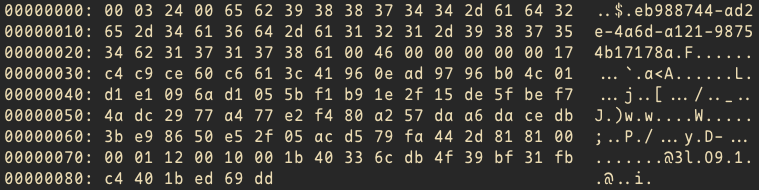
Since the base64-decoded output includes more than just a GUID, we need to examine the raw bytes to see what else is embedded. Converting the data to hexadecimal lets us visually analyze the structure and identify the offset where the PR_ENTRYID is stored.
We will use the following command sequence to achieve our objective:
base64 -d owa_id | xxd -g1The output from the command above gives us a view of the full hex byte layout:
To determine where the PR_ENTRYID begins within the decoded bytes, I performed a simple test using a known message.
First, I used MFCMAPI to inspect the 70-byte PR_ENTRYID of the test message. Then, I opened the same message via Outlook Web Access, previewed the sample attachment, and captured the corresponding GetFileAttachment request using the browser developer tools.
After decoding the base64 id parameter from the request into raw hex bytes, I compared the result to the known PR_ENTRYID of the test message as viewed in MFCMAPI. This comparison confirmed that the PR_ENTRYID is a component of the decoded bytes and begins at byte offset 44. The preceding 43 bytes contain metadata, but are not part of the EntryId itself.
Understanding the First 43 Bytes
00 03 24 00 | GUID | 00 | 46 00 | PR_ENTRYID | Trailing BytesThe first 43 bytes of the decoded Id represent structural metadata that precede the actual PR_ENTRYID. Here’s what they contain:
- 4-byte header (00 03 24 00): A fixed header that appears consistently across all decoded Id values.
- 36-byte ASCII-encoded GUID: Encoded as plain ASCII characters. Each character including the dash (-) is 1 byte, so the full GUID takes up 36 bytes.
- 1-byte null terminator (00): Marks the end of the ASCII GUID string.
- 2-byte marker (46 00): A fixed byte that consistently appears after the null terminator. This likely acts as a delimiter before the PR_ENTRYID.
These first 43 bytes are important for structure but do not contain the actual message reference. The PR_ENTRYID starts immediately after this region.
Extracting the PR_ENTRYID
The Python script below takes the base64-encoded Id parameter from an OWA GetFileAttachment request, decodes it to raw bytes, and extracts the 70-byte PR_ENTRYID. This hex value can then be used in MFCMAPI to locate the specific email message accessed through Outlook Web Access.
#!/usr/bin/env python3

import base64
import sys
from pathlib import Path

ENTRYID_OFFSET = 43
ENTRYID_LENGTH = 70

def extract_entryid(base64_str):
    decoded = base64.b64decode(base64_str.strip())
    if len(decoded) < ENTRYID_OFFSET + ENTRYID_LENGTH:
        raise ValueError("Decoded data is too short to contain a full PR_ENTRYID.")
    return decoded[ENTRYID_OFFSET : ENTRYID_OFFSET + ENTRYID_LENGTH]

if __name__ == "__main__":
    if len(sys.argv) != 2:
        print("Usage: python extract_entryid.py <base64_string_or_path>", file=sys.stderr)
        sys.exit(1)

    arg = sys.argv[1]

    if Path(arg).is_file():
        base64_input = Path(arg).read_text()
    else:
        base64_input = arg

    try:
        entryid = extract_entryid(base64_input)
        print(entryid.hex())
    except Exception as e:
        print(f"Error: {e}", file=sys.stderr)
        sys.exit(1)
If you’d prefer a pure command-line approach without scripting, here’s how to do the same with built-in Linux tools:
base64 -d owa_id | dd bs=1 skip=43 count=70 status=none | xxd -p -c-which will give us our PR_ENTRYID value of:
0000000017c4c9ce60c6613c41960ead9796b04c01d1e1096ad1055bf1b91e2f15de5fbef74adc2977a477e2f480a257daa6dacedb3be98650e52f05acd579fa442d81810000Locating the Message in MFCMAPI

To complete the investigation and correlate the extracted PR_ENTRYID to a specific message, you’ll need to use MFCMAPI—a low-level MAPI client provided by Microsoft. MFCMAPI is a Windows-only tool, so macOS and Linux users will need to run it within a compatible Windows environment. Once you’re set up, follow these steps:
- Download and launch MFCMAPI You can find the latest release on GitHub. No installation is required.
- Log on to a mailbox profile From the menu bar, go to Session → Logon. Select an Outlook profile that has access to the target mailbox.
- Access the EntryID search dialog Once logged in and the mailbox store is opened, go to Tools → EntryID → Open Given EntryID.
- Paste the extracted PR_ENTRYID In the dialog that appears, paste the 70-byte hex string (with no spaces), and click OK.
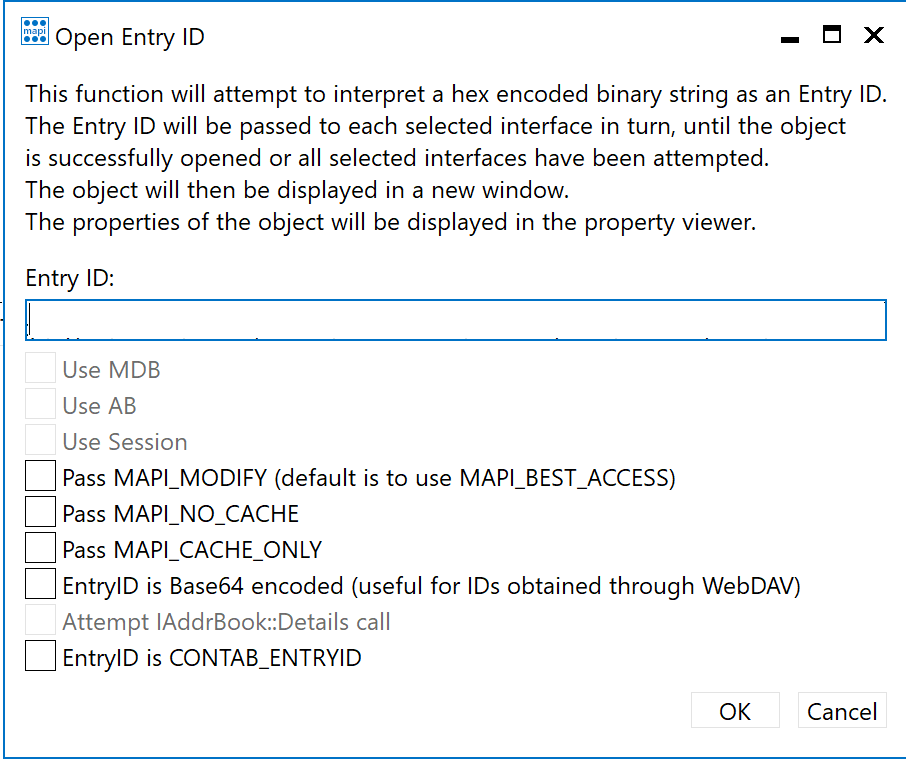
If the EntryID is valid and the message still exists in the mailbox, MFCMAPI will open it in a property viewer, allowing you to inspect metadata, headers, attachment presence, and other MAPI fields directly.
Wrapping Up
In environments where audit logs may be missing or incomplete, decoding Id parameters from OWA GetFileAttachment requests can be an invaluable method for reconstructing what messages or attachments were accessed during an intrusion. By understanding the structure of these values, extracting the embedded PR_ENTRYID, and leveraging tools like MFCMAPI, defenders gain an additional way to trace attacker activity even in the absence of mailbox auditing.
If you’ve discovered ways to go deeper—such as correlating a specific attachment instead of just the message—I’d love to hear about it. Feel free to reach out or leave a comment so others can benefit from shared techniques.